

AI Tools Every Freelancer Should Use in 2026
- Dec 29, 2025
- 6 min read
Updated: Apr 1
If you are freelancing in 2026, AI is no longer something you can ignore or “get to later.” It is already baked into how successful freelancers work, market themselves, communicate with clients, and manage their time.
The good news is you do not need dozens of complicated tools. You only need a handful of smart AI platforms that genuinely save you time and mental energy so you can focus on paid work, growth, and flexibility.
In this guide, I am walking you through five core AI tools every freelancer should be using, plus practical ways to use AI across proposals, outreach, content, and time management.

Why AI Matters More Than Ever for Freelancers
Freelancers are facing more pressure than ever. Competition is increasing, deadlines are tighter, and clients expect more across every project. AI helps freelancers meet these demands by automating routine work and supporting creative thinking.
Increased productivity: AI helps freelancers work more efficiently by handling repetitive tasks and speeding up everyday processes. This allows projects to be completed faster without sacrificing quality.
Improved client communication: AI tools make it easier to personalise client messages, follow ups, and outreach. Clear and tailored communication helps build stronger relationships and improves responses from potential clients.
Better proposal success: AI powered proposal tools help freelancers create polished, professional proposals that clearly communicate value. This saves time and increases confidence when pitching services.
Content quality and speed: AI writing tools help freelancers create drafts, outlines, and finished content more quickly. This frees up time for refining ideas, improving quality, and taking on new work.
Smarter time management: AI scheduling and task planning tools reduce time spent on admin and organisation. Freelancers can focus more on paid work while maintaining better balance in their day.
AI Tool 1: Proposal Automation with PandaDoc
Creating proposals can feel time consuming and repetitive, especially when you are juggling multiple clients. PandaDoc uses AI to simplify the process by generating customised proposals based on client details and project requirements, suggesting relevant content, pricing, and terms that align with each client's needs.
How it helps:
Saves hours by eliminating the need to draft proposals from scratch
Reduces decision fatigue around structure and wording
Allows you to respond to client enquiries much faster
Key features:
Smart, reusable proposal templates
Built-in e-signature integration
Real-time tracking to see when clients view your proposal
A freelance graphic designer used PandaDoc to cut proposal creation time from several hours to around thirty minutes. With faster turnaround times and more professional proposals, they were able to increase their monthly client wins and respond to opportunities more confidently.

AI Tool 2: Client Outreach with Crystal
Reaching out to potential clients can feel awkward, especially when you are not sure how formal or casual your message should be. Crystal uses AI to analyse a client's communication style and personality based on their online presence, then suggests personalised email templates and messaging approaches that match how that person prefers to communicate.
How it helps:
Improves response rates by matching tone, language, and style
Takes the guesswork out of writing cold emails and follow ups
Helps your messages feel natural instead of salesy
Key features:
Personality and communication style insights
AI generated email templates tailored to each contact
Follow up reminders to keep outreach consistent
A freelance writer struggling with cold outreach used Crystal to refine their email tone and structure. By sending messages that better matched each client's communication style, they saw a noticeable increase in replies and more positive conversations with potential clients.

If you want to go further with building and growing your freelance client base, the Complete Freelancer Toolkit covers everything from finding and attracting high-paying clients to virtual networking and productivity strategies, giving you a complete system for running a thriving freelance business.
AI Tool 3: Content Creation with Jasper AI
Jasper AI is a powerful writing assistant designed to help freelancers create blog posts, social media content, and marketing copy quickly and clearly. It is especially helpful when you are staring at a blank page or racing against a deadline.
How it helps:
Speeds up content creation without sacrificing quality
Helps you stay consistent even when creativity feels low
Reduces writer's block and mental fatigue
Key features:
Multiple writing tones and styles to match different clients
Built-in SEO optimisation tools
Plagiarism checker for peace of mind
A freelance marketer used Jasper AI to streamline their writing process and cut content production time significantly. By working faster and more efficiently, they were able to take on more client projects while maintaining the same quality standards.

AI Tool 4: Time Management with Motion
Managing your calendar as a freelancer can quickly become overwhelming, especially when meetings, deadlines, and shifting priorities all compete for the same limited hours. Motion is an AI powered time management tool that automatically builds your daily schedule by combining your tasks, meetings, and projects into one intelligent, constantly updated plan.
Unlike a basic calendar app, Motion adjusts in real time. When a meeting overruns or an urgent task appears, it automatically reschedules everything else around it so your day stays on track without you having to manually move things around.
How it helps:
Automatically prioritises and schedules tasks based on deadlines and available time
Protects focus time so deep work doesn't get swallowed by admin and meetings
Reduces the mental load of planning your day from scratch every morning
Key features:
AI task planner with automatic daily scheduling
Dynamic calendar that adjusts as priorities change
Project management and deadline tracking built in
Integrates with Google Calendar and Outlook
A freelance developer juggling multiple client projects started using Motion to manage their workload. Instead of spending time each morning deciding what to work on, Motion built their daily plan automatically, freeing up mental energy and helping them consistently meet deadlines without the stress of constant replanning.
With Motion handling your schedule in the background, you can stop losing time to planning and start spending it on the work that actually grows your business.

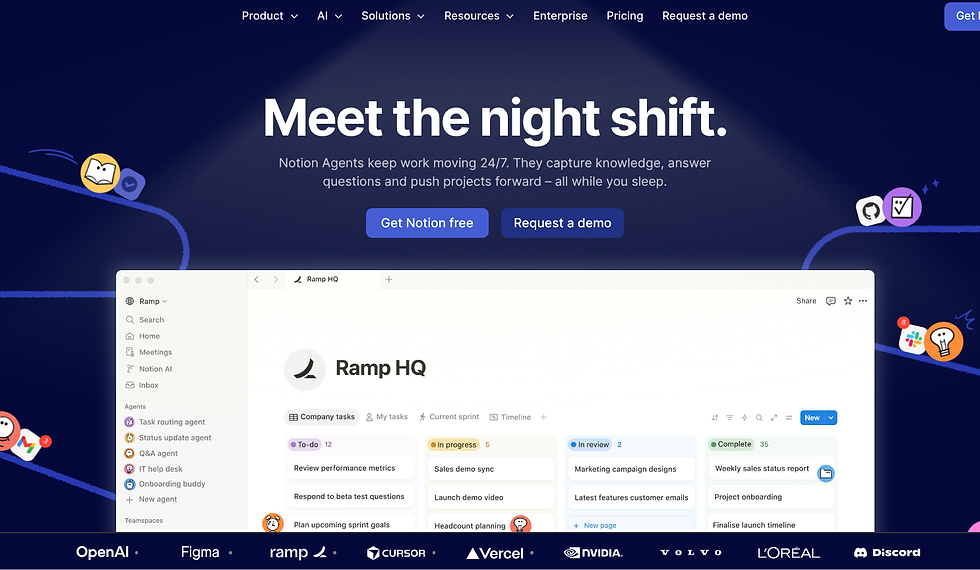
AI Tool 5: Workflow and Organisation with Notion AI
Keeping track of projects, notes, ideas, and client information can quickly become messy when everything lives in different places. Notion AI combines organisation and artificial intelligence into one flexible workspace that helps freelancers stay focused and in control.
Notion AI helps turn scattered thoughts into clear plans. You can use it to organise client projects, create content calendars, store proposals, and manage workflows without jumping between tools.
How it helps:
Keeps all your projects, notes, and tasks in one place
Reduces mental clutter and decision fatigue
Helps you stay organised even when work gets busy
Key features:
AI generated summaries, outlines, and action points
Smart task lists and project dashboards
Custom templates for freelancers and creatives
A freelance consultant used Notion AI to centralise client notes, meeting summaries, and project plans. By letting AI summarise calls and organise tasks automatically, they spent less time reviewing information and more time delivering quality work.
If you want to get smarter with how you use AI tools like these across your whole business, the ChatGPT Essentials Bundle shows you exactly how to use AI as a practical business tool, covering digital product ideas, content repurposing, faceless marketing, and social media strategy in six practical guides and prompt packs.
How to Choose the Right AI Tools for Your Freelance Business
Not every AI tool is right for every freelancer. The key is choosing tools that genuinely support how you work, rather than adding more complexity to your day.
Your workflow: Look at where most of your time goes or where you feel the most stress. The best AI tools solve your biggest problems first.
Ease of use: Choose tools with simple, intuitive layouts. If a tool feels complicated or overwhelming, it is less likely to save you time in the long run.
Integration: AI tools work best when they fit into the software you already use, such as your email platform, Google Calendar, or project manager.
Cost vs benefit: Consider whether the time and energy saved is worth the monthly cost. A tool that saves hours each week often pays for itself quickly.
Trial periods: Take advantage of free trials or demos whenever possible. Testing a tool in your real workflows helps you decide if it actually improves how you work.
If you are new to using AI, start small. Automate one area of your business first, such as proposals or scheduling. Once that feels comfortable, you can gradually expand AI into other parts of your freelance workflow.
Final Thoughts on AI for Freelancers in 2026
AI tools are no longer optional extras for freelancers. They have become essential for staying competitive, delivering high quality work, and managing time in a way that supports both income and wellbeing.
The five tools covered here, PandaDoc, Crystal, Jasper AI, Clockwise, and Notion AI, each address a key challenge freelancers face, from client outreach and proposals to content creation and time management.
When used thoughtfully, AI allows freelancers to spend more time doing the work they enjoy and less time stuck in repetitive admin. Instead of replacing your skills, these tools support them, helping you work more efficiently and confidently every day.
If you are ready to grow your freelance business without burning yourself out, the How to Start a Freelance Business workbook gives you step-by-step guidance, worksheets, and real-world examples to help you build a profitable and flexible freelance business from scratch, whether you are just starting out or ready to take things to the next level.

Comments